UGC Studio guide
How to Create UGC Videos with Seedance 2.5 on Qeno AI
Table of Contents
Creating a UGC video for your product doesn't always have to mean finding a creator, sending them your product, and waiting for the final shoot. If you want to try different ideas for your next ad, you can now do a lot of that with AI.
In this guide, I'll walk you through how to create a UGC-style video using Seedance 2.5 on Qeno AI. We'll use a skincare product as an example and go through the same steps you can follow for your own product.
Step 1: Open the Video Section
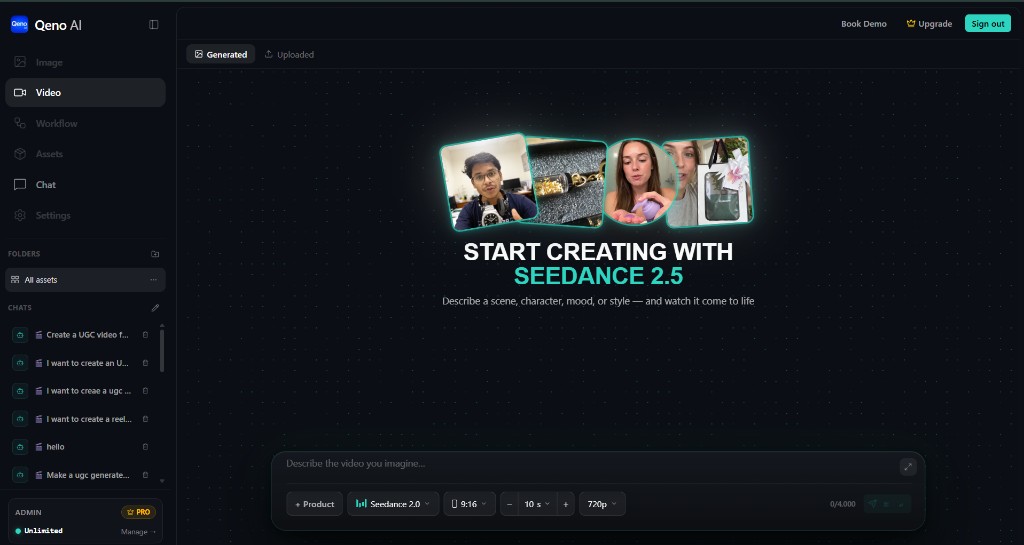
First, log in to your Qeno AI account and click on Video in the left-hand sidebar.
This will take you to the video creation screen. You'll see a prompt box at the bottom where you can describe the video you want to make, along with options to select a model, set the video duration, and choose the resolution.
Step 2: Choose Seedance 2.5
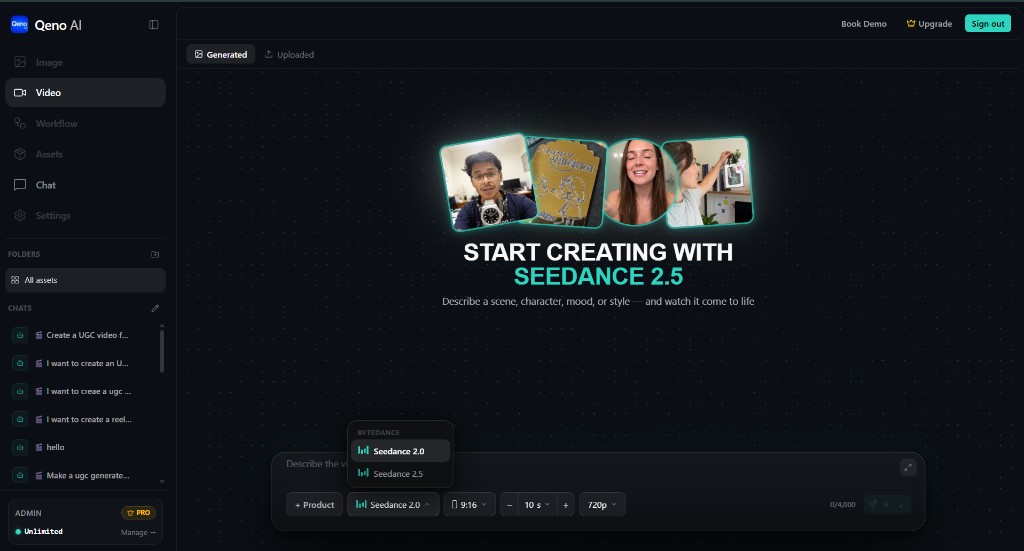
At the bottom of the screen, click on the model dropdown. You'll see the available options, including Seedance 2.0 and Seedance 2.5.
Select Seedance 2.5 to continue. Once you've selected the model, you're ready to add your product and tell Qeno AI what kind of video you have in mind.
Step 3: Add Your Product
Click on the + Product button beside the prompt box.
A window will open showing the products you've already added to Qeno AI. If your product is there, just select it.
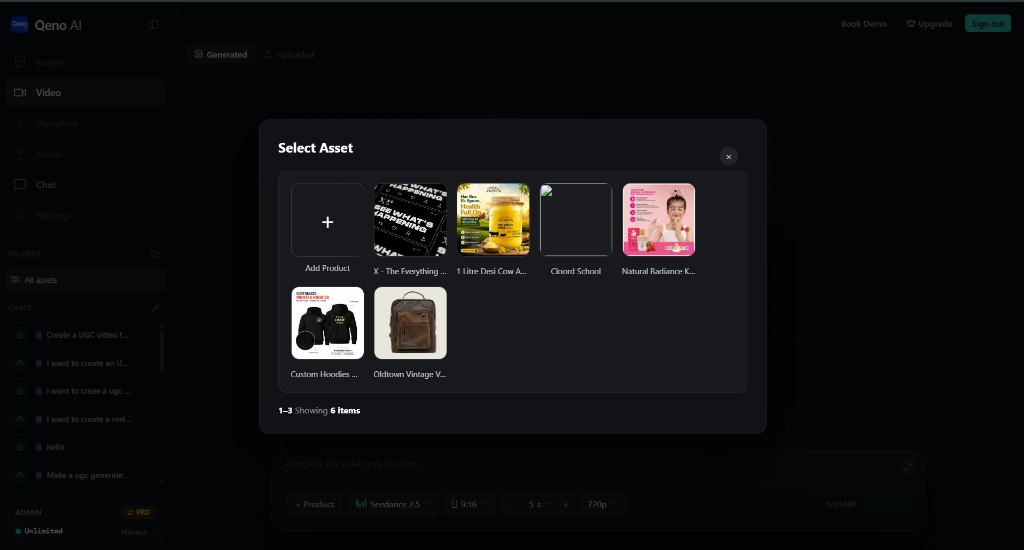
If you're creating a video for a new product, click on Add Product. You'll then get the option to import your product from a URL or enter the details manually.
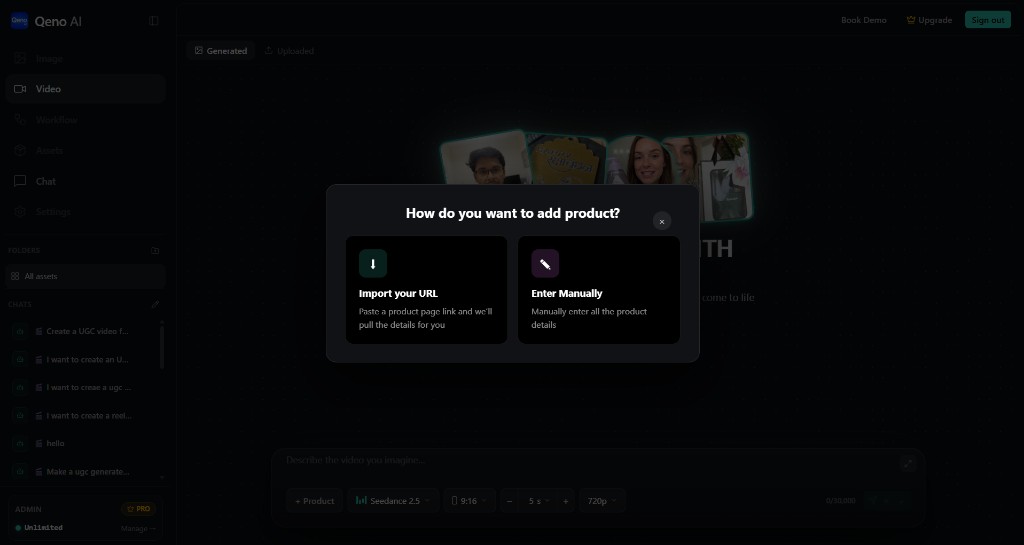
Step 4: Import Your Product
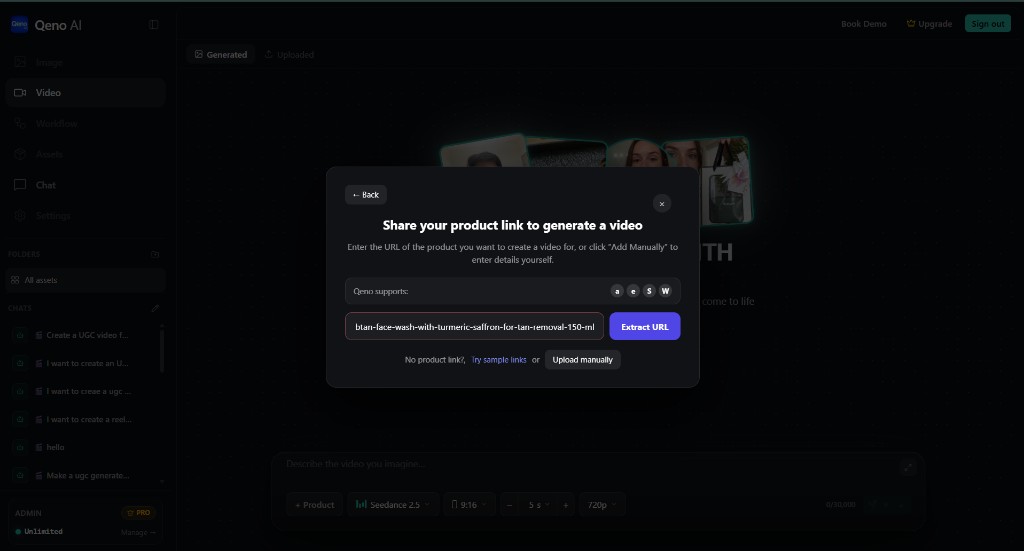
If your product is listed on an online store, the easiest way to add it is through its product page URL.
Choose Import your URL, paste the complete product link, and click Extract URL. Qeno AI will attempt to fetch the product details and images from that page.
Don't have a product link? No problem. Choose the manual option and enter the details yourself. For this walkthrough, we're using the URL method to add our skincare product.
Step 5: Check Your Product Details
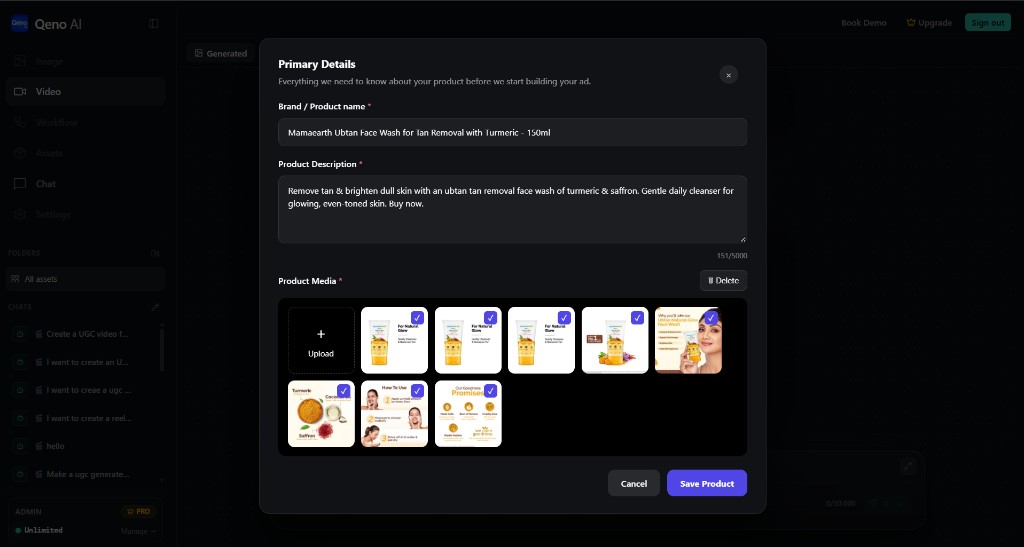
Once the product information has been extracted, you'll see a form containing the product name, description, and images.
Take a moment to check everything. Make sure the product name is correct, the description explains what the product does, and the images clearly show the product.
You can upload more images or remove ones you don't need. When you're happy with the details, click Save Product. That's it — your product is now ready to use in the video creation process.
Step 6: Describe the Video You Want to Create
Now comes the fun part.
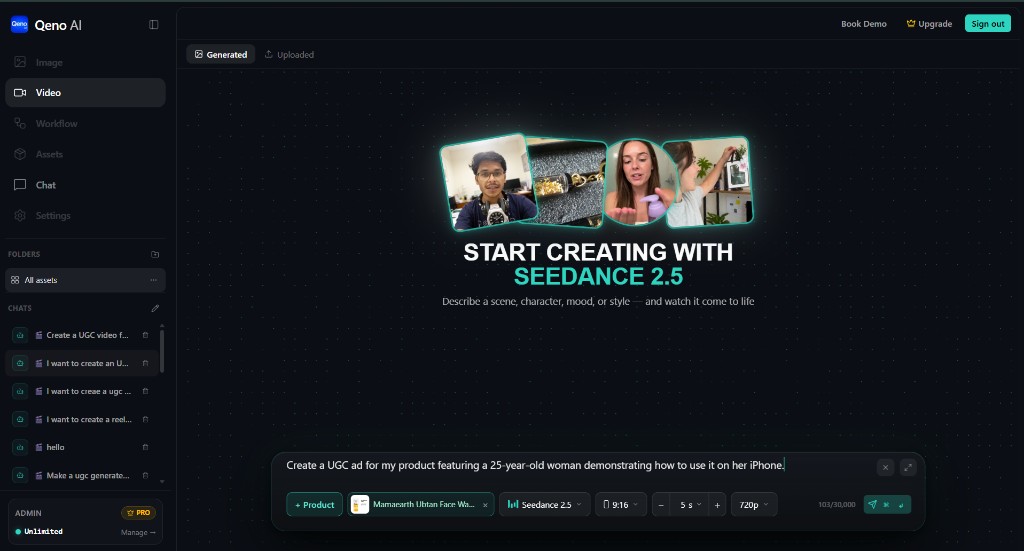
Return to the video creation screen. You'll see your product attached to the prompt box. This is where you tell Qeno AI what your video should look like.
For our example, we want a young woman to demonstrate how to use a face wash and record the video in a casual, UGC-style format.
Here's the prompt we're using:
“Create a UGC ad for my product featuring a 25-year-old woman demonstrating how to use it on her iPhone.”
You can use the same approach for your own product. Think about who should appear in the video, how they should use the product, and what you want the viewer to take away from it.
You don't need to figure out every camera angle or scene yourself. Start with your idea and let the AI Video Agent help you develop it further.
Step 7: Set Your Video Preferences
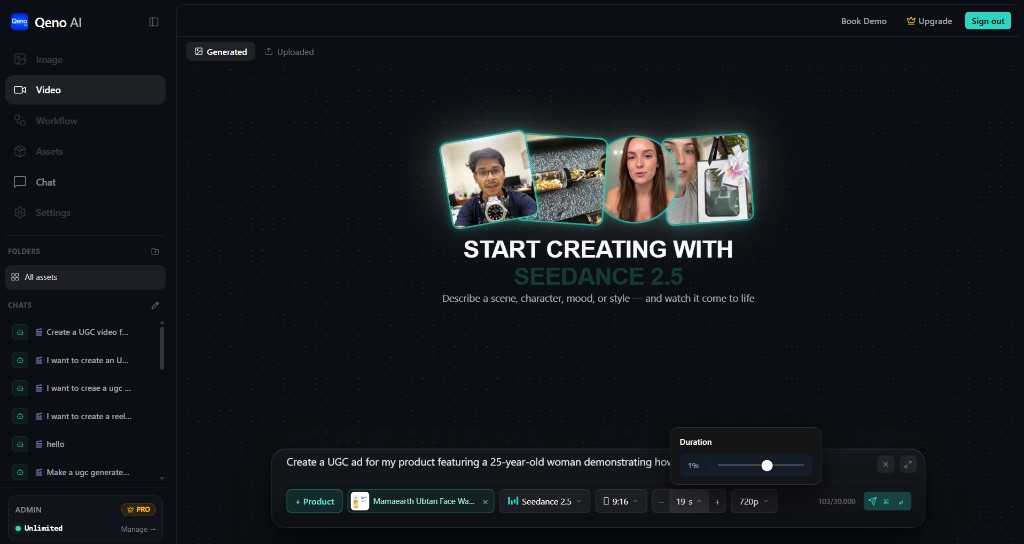
Before moving ahead, choose the settings for your video. For this example, we're using:
- Model: Seedance 2.5
- Aspect ratio: 9:16
- Duration: 19 seconds
- Resolution: 720p
We're using a vertical format because it works well for platforms such as Instagram Reels and YouTube Shorts.
You can change the duration or resolution depending on what you need. Once everything looks right, you're ready to submit your idea.
Step 8: Let the AI Video Agent Help You Build the Concept
Submit your prompt to the AI Video Agent.
Instead of jumping straight into video generation, the agent works with your idea and product references to develop a more detailed creative direction.
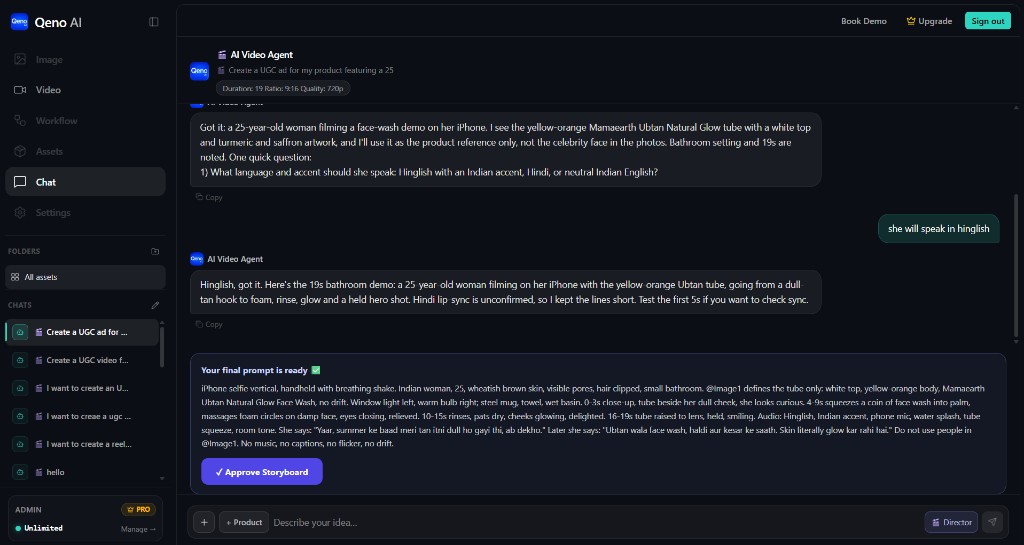
It may ask you a few questions to understand what you're looking for. In our example, it asks which language the woman should speak.
We're going with Hinglish, so the video feels more natural for an Indian audience.
After that, the agent prepares a detailed prompt describing the scene, the way the product should be demonstrated, and what the creator should say.
This is also your chance to make adjustments. If you have a particular style or way of presenting your product in mind, tell the agent before moving to the next step.
Step 9: Review and Approve the Storyboard
Once the creative direction is ready, Qeno AI presents the final prompt for you to review.
For our face-wash example, the proposed sequence includes an opening shot, applying the product, rinsing the face, and finishing with a close-up of the product. It also includes the Hinglish dialogue for the video.
Read through the prompt and make sure it matches what you had in mind.
Happy with the result? Click Approve Storyboard. This confirms the storyboard and moves the workflow forward. You can then follow the next steps in Qeno AI to generate your video.
Step 10: Generate Your Video
Once you've approved the storyboard, continue with the video generation process in Qeno AI.
When your video is ready, watch it from beginning to end. Check whether the product looks right, the demonstration makes sense, and the overall video feels suitable for your brand.
You should also check the dialogue, audio, and visual consistency before using it in an ad.
If the result isn't quite what you wanted, you can refine your creative direction and try another version where supported.
That's It! Your UGC Video Is Ready to Go
And that's how you can create a UGC-style product video with Seedance 2.5 on Qeno AI, starting with a product link and ending with an AI-generated video.
You don't have to start with a complicated brief. Add your product, explain your idea, work through the storyboard, and see what you can create.
Whether you're working on a skincare ad, a fashion product, or something else entirely, the same workflow can help you explore new creative ideas for your next campaign.